
Download Print Conductor – Free Batch Printing Software for Windows, Mac & Cloud
Print Conductor is a powerful, free batch printing software designed for users who regularly handle large-scale printing tasks. Whether you're managing documents in a corporate office, preparing academic materials, or organizing personal projects, this tool simplifies the entire printing workflow. With support for over 20 file types—including PDF, DOCX, JPG, TIFF, TXT, and more—Print Conductor streamlines the process of printing multiple files at once.
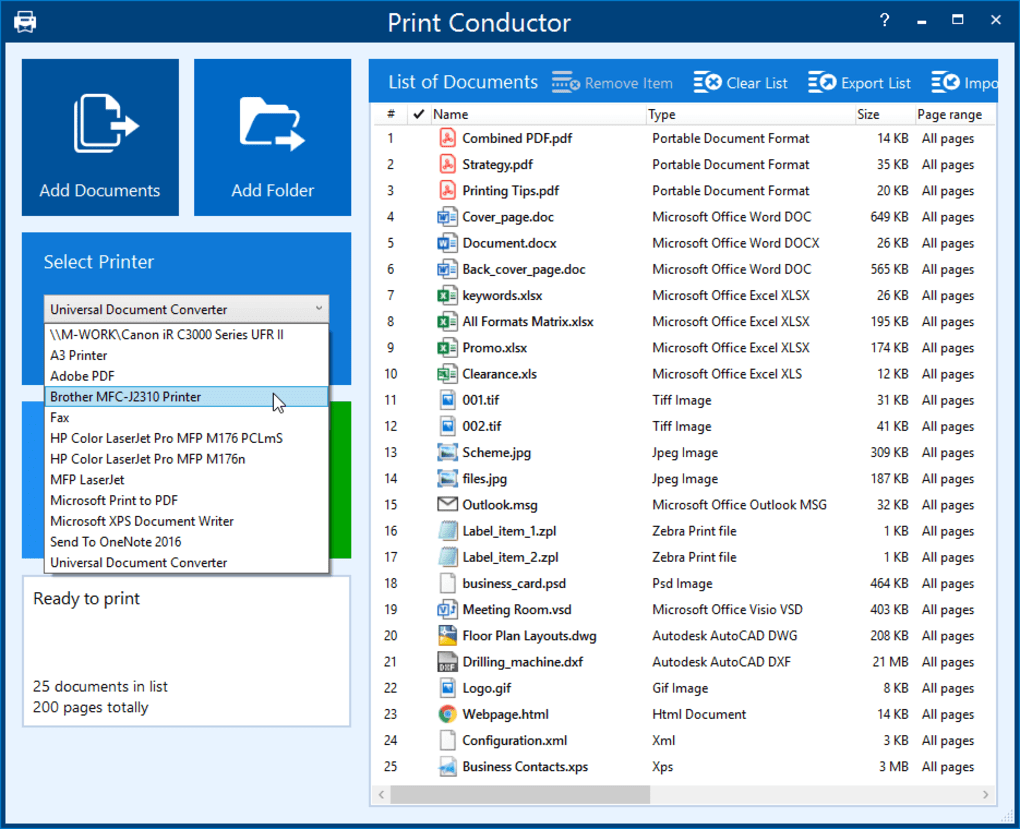
Its intuitive interface allows users to drag and drop files directly into the application, eliminating the need to open each document individually. The software supports both standalone and network printers, as well as virtual print drivers and cloud-based print services, making it ideal for modern, hybrid work environments. Print Conductor also offers customizable print settings, including grayscale, full-color, duplex printing, and page range selection.
With automatic batch processing and intelligent file organization, this software is a must-have for anyone seeking a faster, more secure, and efficient printing experience. Download Print Conductor today and transform how you manage bulk printing tasks across Windows, Mac, and cloud-connected devices.
Effortless Batch Printing with Intelligent Automation
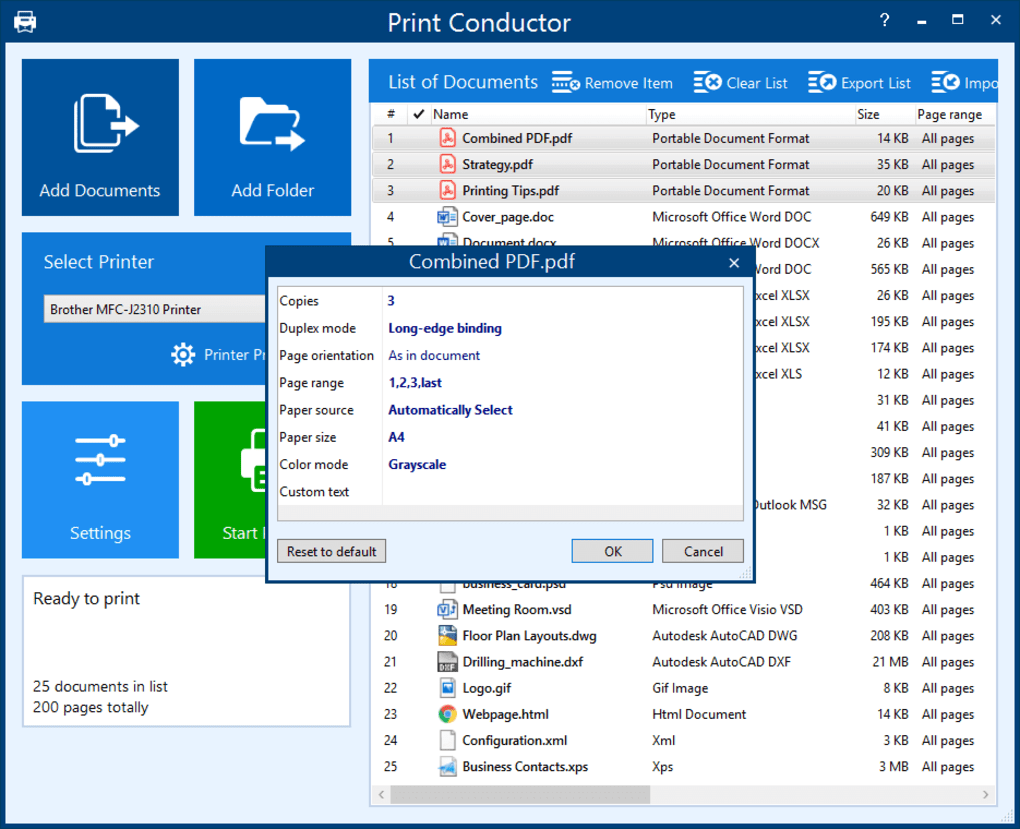
Print Conductor redefines how users approach batch printing by combining automation with user-friendly design. Unlike traditional printing methods that require opening and printing each file individually—often leading to errors, delays, and frustration—this software enables users to simply drag and drop entire folders or multiple documents into the interface. The application instantly scans and organizes the files, presenting them in a clean, sortable list. This centralized view makes it easy to review, reorder, and manage your print queue before initiating the process. One of the standout features is its ability to preserve original formatting and layout across different file types, ensuring consistent output quality whether you're printing contracts, reports, or image portfolios. The software intelligently detects file formats and applies the correct print settings automatically, reducing the chance of misprints or formatting issues. For advanced users, Print Conductor offers granular control over print parameters, such as paper size, orientation, color mode, and print quality. You can also set up custom print profiles for recurring tasks, saving time on repetitive configurations. The automation extends beyond file handling: Print Conductor can be scheduled to run at specific times, ideal for overnight printing jobs in office environments. This feature is especially useful for businesses that need to prepare documents for meetings or client deliveries without manual intervention. With built-in error handling and progress tracking, users receive real-time updates on print status and can pause or resume jobs as needed. The software is lightweight and runs efficiently in the background, consuming minimal system resources. Whether you're a small business owner, a teacher preparing student handouts, or a freelance designer managing multiple client projects, Print Conductor’s automation capabilities significantly reduce manual workload and increase productivity.Support for Diverse File Types and Cross-Platform Compatibility
One of the most compelling reasons to choose Print Conductor is its exceptional file format support. The software natively handles a wide array of document types, including PDF, DOCX, DOC, XLSX, PPTX, TXT, JPG, PNG, TIFF, BMP, and even some CAD and vector files. This versatility ensures that no matter what kind of documents you're working with, Print Conductor can process them without requiring additional converters or plugins. The software uses advanced file parsing technology to extract content accurately, preserving text, images, and layout integrity across all supported formats. This is particularly valuable for users who frequently work with mixed document types, such as marketing teams compiling reports, legal professionals reviewing case files, or educators preparing lesson materials. Print Conductor’s compatibility extends beyond file types—it’s designed to work seamlessly across multiple operating systems. It is available for Windows (7 and later), Mac (OS X 10.12 and above), and supports integration with cloud storage platforms like Google Drive, Dropbox, and OneDrive. This cross-platform functionality means you can start a print job on your desktop and continue it from a tablet or mobile device. Additionally, the software supports network printers and virtual print drivers, making it suitable for both home offices and enterprise environments. Whether you're printing from a local machine or a remote server, Print Conductor maintains consistent performance and reliability. The installation process is straightforward: download the installer from the official website, run it, and follow the on-screen prompts. No complicated configurations are required—just launch the app and start printing. Regular updates are released to improve stability, add new features, and enhance security, ensuring long-term usability. With its robust compatibility and future-proof design, Print Conductor stands out as a reliable, secure, and scalable solution for modern printing needs.Pros and Cons: Is Print Conductor Right for You?
- Pros:
- Free to download and use with no hidden costs
- Supports over 20 file types, including PDF, DOCX, JPG, TIFF, and more
- Intuitive drag-and-drop interface for easy file management
- Automated batch printing saves hours of manual work
- Customizable print settings: color, grayscale, duplex, page range
- Compatible with Windows, Mac, and cloud-based printers
- Lightweight and efficient, with minimal system impact
- Regular free updates for improved performance and security
- Cons:
- No native mobile app (iOS/Android) for direct printing
- Advanced features require some technical understanding
- Limited support for very large files (over 1GB)
- No built-in OCR for scanned documents
- Customer support is limited to community forums and FAQs
Frequently Asked Questions (FAQ)
Is Print Conductor free to use?
Yes, Print Conductor is completely free to download and use. There are no trial periods, subscription fees, or hidden charges. The software is available for Windows and Mac users with full access to all core features, including batch printing, file format support, and customizable print settings.
Which file types does Print Conductor support?
Print Conductor supports a wide range of file types, including PDF, DOCX, DOC, XLSX, PPTX, TXT, JPG, PNG, TIFF, BMP, and more. It also handles some CAD and vector formats, making it suitable for diverse printing needs across education, business, and creative industries.
Can I use Print Conductor with network and cloud printers?
Yes, Print Conductor is fully compatible with network printers, virtual print drivers, and cloud-based printing services like Google Cloud Print and Microsoft Print to PDF. This makes it ideal for remote teams and hybrid work environments.
Does Print Conductor work on Mac and Windows?
Yes, Print Conductor is available for both Windows (7 and later) and Mac (OS X 10.12 and above). The interface is consistent across platforms, ensuring a seamless experience regardless of your operating system.
Is there a mobile version of Print Conductor?
Currently, Print Conductor does not offer a native mobile app for iOS or Android. However, you can manage print jobs from mobile devices by accessing cloud storage linked to the software or using remote desktop tools.







